Powered by NeoSense™ AI — available in 8+ IDEs

The first context-aware testing engine built on a knowledge graph.

TestNeo connects your code, requirements, user behaviour, and APIs into a knowledge graph — then generates, heals, and prioritises tests automatically. Built for teams who ship fast.

Free to start
2-min setup
No credit card
VS Code, Cursor, Windsurf
checkout-flow.testneo
// Generated from: CartService.checkout()
1. Navigate to "https://app.example.com/cart"
2. Click "Proceed to Checkout" button
3. Enter "4242 4242 4242 4242" in Payment field
4. Click "Place Order"
5. Verify "Order confirmed" message is displayed
✓ Passed · 1.4s · Self-healing active
70%
Less maintenance
10×
Faster authoring
Chrome
Powered by Chromium
8+
IDE platforms

From code to tested in 30 seconds

Everything you need to ship tested code

AI-powered

NLP test generation

Right-click any function and get plain-English test cases generated from your actual code logic. No frameworks to learn, no test code to write.

  • Reads function signatures, logic branches, and edge cases
  • Generates human-readable steps anyone can edit
  • Supports REST APIs, UI flows, and unit logic
CartService.js
function checkout(cart, user) {
  // ... 47 lines of business logic
Go to Definition
Find All References
TestNeo: Generate Tests
TestNeo: Run Tests
✓ Generated 5 test cases in 1.2s
1. Navigate to "/cart"
2. Click "Checkout" button
3. Verify "Order confirmed"
Zero maintenance

Self-healing tests

When buttons move, IDs change, or layouts shift, tests adapt automatically. No more broken selectors or midnight maintenance runs.

  • AI finds elements by context and meaning, not brittle selectors
  • Logs every heal so you know what changed and why
  • Works across DOM restructures, class renames, and layout shifts
Before — v2.3
#checkout-btn-primary
Element removed in DOM update
Self-healed
After — v2.4
Click "Place Order" button
Matched by text content + role
[heal] checkout.testneo:4 selector updated · confidence 97% · test passed
Smart selection

Impact analysis

Every commit is mapped to affected tests. Know exactly what to run, what's at risk, and what changed — before you push.

  • Maps code changes to test cases automatically
  • Prioritises high-risk tests for faster CI feedback
  • Shows coverage gaps introduced by each PR
feat: update payment flow
3 files changed · 2m ago
High checkout-flow.testneo Must run
High payment-validation.testneo Must run
Med cart-summary.testneo Recommended
Low user-profile.testneo Skipped
4 tests analysed · 2 must run · 1 recommended · 1 skipped
AI confidence 95%

Visual regression AI

Catch visual bugs before your users do. Smart AI analyses every pixel, detects flaky tests, and approves changes in bulk. 50× faster than manual review.

95%AI confidence
80%Fewer false positives
50×Faster approvals
10sReview 50 changes
Critical Functional 95% confidence
Payment button moved outside viewport
Recommendation: Reject
Cosmetic Style 91% confidence
Font weight changed 400 → 500 on header
Recommendation: Approve
Classifies: Layout · Content · Style · Functional
⚠️ Flaky pattern detected 80% confidence
5 runs · 2.1% avg diff · 2 flaky regions
Add ignore regions for dynamic content (timestamps, ads)
Reduces false positives by 60–80%
20 comparisons selected
Header redesign v3.0
homepage.pngStyle
pricing.pngStyle
dashboard.pngLayout
✓ Approve all (20)
Baselines updated in 2s
Up to 100 comparisons per batch
Built-in Lighthouse

Performance intelligence

Lighthouse scores, Core Web Vitals, and load-time benchmarks baked into every test run. Performance regressions surface before deploy.

  • Automated Lighthouse audits on every test execution
  • Tracks LCP, FID, CLS trends across releases
  • Alerts on regressions before they reach production
92 Performance
LCP
1.8s
FID
45ms
CLS
0.12
↑ 3pts vs last release · CLS needs attention
Swagger & Postman

API test generation from your specs

Upload a Postman collection or Swagger/OpenAPI spec and TestNeo generates NLP test cases covering happy paths, negative scenarios, auth flows, and boundary values — across every endpoint. When the spec changes, impact analysis flags affected tests automatically.

  • Postman JSON → NLP test suite with auth and chaining preserved
  • OpenAPI YAML/JSON → full coverage including edge cases
  • Schema changes trigger impact analysis on linked tests
  • Bearer, API Key, and Basic Auth handled automatically
Postman
Swagger
Impact
checkout-api.postman.json ✓ Imported
POST /api/checkout → 4 tests
GET /api/cart/{id} → 3 tests
PUT /api/cart/{id}/items → 5 tests
✓ 12 NLP test cases generated · Auth preserved · Chaining detected
openapi-v3.yaml ✓ Parsed
18
Endpoints
52
Tests generated
6
Auth scenarios
14
Negative cases
✓ Full coverage · Happy + negative + boundary + auth
Schema change detected
POST /api/checkout — field "coupon" added (required)
High checkout-flow.testneo Needs update
High payment-validation.testneo Needs update
Med cart-total.testneo Review
3 tests affected · 2 must update · 1 review

From code to confidence in four steps

1

Install extension

Add TestNeo to VS Code, Cursor, or Windsurf. Takes under two minutes, no configuration needed.

2

Right-click any function

Select your code, choose "Generate Tests" from the context menu. The AI reads your logic and creates NLP test cases.

3

Run and watch

Execute tests locally or in the cloud. See results in real time with detailed failure analysis and self-healing logs.

4

Ship with confidence

Integrate with your CI/CD pipeline. Tests run on every push, heal when things change, and flag what matters.

From code to confidence in minutes

See how TestNeo's intelligent platform guides you through the complete testing lifecycle.

Step 1

Start where you code

TestNeo lives right inside VS Code. Right-click any function, select "Generate Tests", and watch AI create comprehensive test scenarios in seconds.

  • Native IDE integration — no workflow disruption
  • AI analyzes your code context automatically
  • Generate tests for functions, components, or entire files
VS Code Integration
Step 2

Execute with one click

Run your tests instantly and see real-time results. TestNeo executes tests on Chrome, captures screenshots, and provides detailed execution logs.

  • One-click execution with real-time status
  • Detailed logs and screenshot capture
  • Automatic screenshot capture for visual validation
Test Execution
Step 3

Understand what matters

Get actionable insights from your test runs. Analytics reveal patterns, identify flaky tests, and show you exactly where to focus for maximum impact.

  • Smart analytics reveal test patterns and trends
  • Identify flaky tests and optimization opportunities
  • Track coverage and quality metrics over time
Test Analytics
Step 4

Ship with confidence

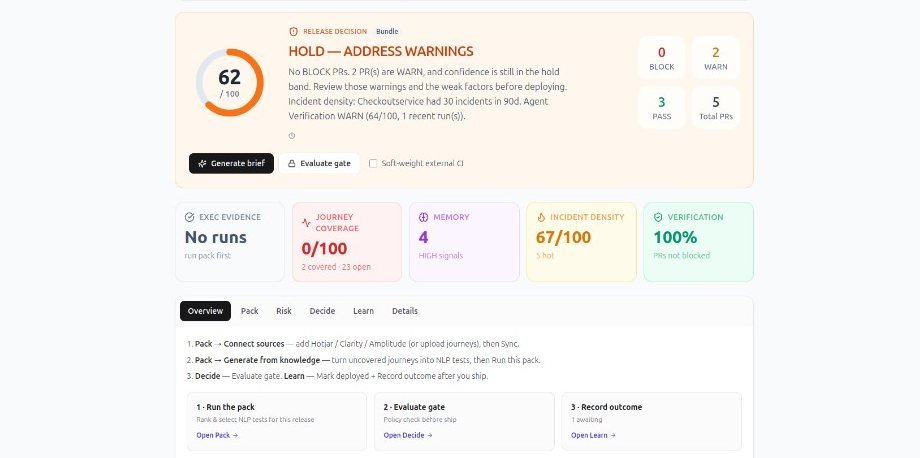
Know the health of every branch before merging. Release quality dashboard gives you complete visibility into test coverage, pass rates, and risk.

  • Real-time branch health and quality metrics
  • Risk assessment before every merge
  • Complete traceability from code to tests
Branch Health Dashboard

Your users already told you what to test

Session replays, funnels, and analytics capture real user behaviour every day. TestNeo turns that data into test cases that cover what actually matters.

Data sources
Knowledge
Graph
Requirements
Test cases
Code files
API endpoints
Bugs
Figma screens

Click any source or node to explore

Watch the demo below or dive in yourself

Auto-exploring...
Hotjar → Knowledge Graph
Session recordings reveal real user flows. AI extracts the paths users actually take — including rage clicks and drop-offs.
Checkout flow — 3 rage clicks detected
→ 8 test cases generated
→ 2 bugs linked (payment timeout)
Mixpanel → Knowledge Graph
Funnel analytics show where users drop off. AI generates tests for every step in the funnel — especially the leaky ones.
Payment funnel — 40% drop-off at step 3
→ 12 test cases covering all paths
→ 3 API endpoints at risk
Jira → Knowledge Graph
Requirements and user stories become graph nodes. Every story links to tests, code, and designs automatically.
PROJ-142: Add coupon field
→ 5 test cases · 2 need update
→ CartService.js, PricingAPI
Figma → Knowledge Graph
Design screens map to requirements and visual regression tests. When designs change, affected tests are flagged.
Checkout redesign v3 — 14 screens
→ 14 visual regression tests
→ 3 screens differ from Hotjar flows
Swagger → Knowledge Graph
API specs auto-generate endpoint tests. Schema changes trigger impact analysis across the entire graph.
POST /api/checkout — schema changed
→ 6 tests affected
→ 2 code files need review
Bug reports → Knowledge Graph
Every bug links to the code, tests, and requirements it touches. See the full blast radius of any defect instantly.
BUG-89: Payment timeout on mobile
→ Linked to PROJ-142, /api/checkout
→ 3 tests now cover this path
Requirements node
Click any requirement to see which tests cover it, which code implements it, and which bugs affect it.
24 requirements imported
→ 89% test coverage
→ 3 uncovered (high risk)
Test cases node
Every test traces back to a requirement, code file, and user flow. No orphan tests, no blind spots.
142 active test cases
→ 98% pass rate (last run)
→ 12 generated from user flows
Code files node
See which tests cover each file. When code changes, impact analysis shows exactly what's at risk.
38 files tracked
→ 4 files with no test coverage
→ 2 files linked to open bugs
API endpoints node
Auto-imported from Swagger. Schema changes trigger alerts across connected tests and requirements.
18 endpoints monitored
→ 52 API test cases
→ 1 breaking change detected
Figma screens node
Design screens link to visual regression tests. When Figma updates, baselines refresh automatically.
14 screens synced
→ 14 visual tests active
→ 2 screens updated this week

Coverage based on reality, not guesswork

The AI builds a unified context across every source — then generates tests based on real user flows, not guesses from a sprint planning meeting six months ago.

Already on Playwright, Selenium, or Cypress?

Before — Selenium WebDriver
login_test.py
# 47 lines of brittle selectors
driver = webdriver.Chrome()
driver.get("https://app.example.com")
driver.find_element(By.ID, "email")
  .send_keys("user@test.com")
driver.find_element(By.ID, "pass")
  .send_keys("secret123")
driver.find_element(By.CSS_SELECTOR,
  "button.btn-primary").click()
After — TestNeo NLP
login-flow.testneo
// 5 lines. Self-healing.
1. Navigate to "https://app.example.com"
2. Enter "user@test.com" in Email
3. Enter "secret123" in Password
4. Click "Sign In" button
5. Verify "Dashboard" is visible
✓ Passed · 0.9s · Self-healing active
Migrate free — zero rewrite required

Works with your entire stack

One extension, every workflow. TestNeo plugs into where you code, how you deploy, and what you test on.

Watching pipeline...
VS Code
Generate tests...
GitHub Actions
Waiting...
TestNeo Cloud
Waiting...
Results
Waiting...
✓ 12 passed· 0 failed· 1.8s total
Self-healing: 1 element healed · Coverage: 94% · No regressions
Code
Write & generate tests
VS Code
Primary IDE
Live
Cursor
AI-first editor
Live
Windsurf
Agentic IDE
Live
Kiro
AI assistant
Live
Codespaces
Cloud IDE
Live
Gitpod
Cloud dev env
Live
push
Build & test
Automated pipelines
GitHub Actions
CI/CD
Live
Jenkins
CI/CD
Live
GitLab CI
CI/CD
Live
CircleCI
CI/CD
Live
Azure DevOps
CI/CD
Live
Jira
Tracking
Live
run
Execute
Cloud & local Chrome
TestNeo Cloud
Managed infrastructure, zero setup
Live
BrowserStack
Real devices via Chrome
Live
LambdaTest
Parallel execution at scale
Live
Local Agent
Run on your machine, behind your VPN
Live
Data stays on your machine
Works behind VPN & firewalls
Real browser on localhost
Windows, macOS, Linux

Start free. Scale as you grow.

No credit card required. Install and start testing in 2 minutes.

Free trial

$0

14 days · no credit card

  • 75 test runs / month
  • 10 AI queries / day
  • 1 project
  • NLP test generation
  • VS Code extension
  • Local & cloud agents
  • 5 Figma uploads
  • 2 bug reports
  • 2 PDF documents
Start free trial

Pro+

$199/mo

For power users & teams

  • 1,000 test runs / month
  • 50 AI queries / day
  • 10 projects
  • Everything in Pro
  • Parallel test execution
  • Advanced analytics
  • Performance intelligence
  • 100 Figma uploads
  • 50 bug reports
  • 25 PDF documents
Get started

Ship tested code, every time.

Install in two minutes. Generate your first test in ten seconds. No credit card required.

Install VS Code extension Start free trial

AI-powered testing for the next generation of software

At the heart of TestNeo.ai is a belief that technology should simplify complex processes, not complicate them. More than a product, TestNeo is a shift in AI-driven software testing — empowering teams, reducing time and costs, and delivering seamless digital experiences.

We're redefining how businesses approach software testing by making it accessible, intelligent, and automated. Powered by NeoSense™ AI Agent and NeoSense™ AI-Q, our platform eliminates manual test writing, framework setup, and constant maintenance — so teams can focus on building great software.

Our mission

Make testing so intelligent and automated that teams never think about test maintenance again. Ship faster, break less, sleep better.

70%
Less maintenance
2 min
Setup time
8+
IDE platforms
Chrome
Browser engine

Common questions, clear answers

What is TestNeo.ai?
TestNeo.ai is an AI-powered test automation platform powered by NeoSense™ AI Agent and NeoSense™ AI-Q. It converts natural language inputs into executable test scripts for both Web and API testing. Key features include self-healing automation, Code Impact Analysis, and intelligent reporting. No coding knowledge required.
Do I need coding skills?
No. TestNeo is designed for all users, from non-technical testers to automation engineers. Use natural language to create tests, or leverage the VS Code extension for code-first workflows.
What is NeoSense™ AI-Q?
NeoSense™ AI-Q is our AI Quality Intelligence layer. It's a context-aware assistant that lets you interact with your test data using natural language. Ask questions about test execution, get intelligent answers, and receive recommendations based on your test history.
Does it integrate with CI/CD?
Yes. TestNeo integrates with Jenkins, GitHub Actions, GitLab CI, CircleCI, Azure DevOps, and more. Run tests automatically on every commit with just a few lines of config.
What is self-healing?
TestNeo's self-healing technology uses AI to automatically adapt to UI and API changes. When elements change, tests update themselves without manual intervention, reducing maintenance by up to 70%.
Can I migrate existing tests?
Yes. TestNeo can automatically convert existing automation scripts from Selenium, Cypress, and Playwright into natural language tests, making migration seamless with zero rewrite required.
Is my data secure?
TestNeo prioritises security with enterprise-grade encryption, role-based access control, and compliance with industry standards. Your test data and code remain secure. The Local Agent option keeps all data on your machine.
Who can use TestNeo.ai?
Anyone looking for faster, smarter test automation — QA engineers, developers, product managers, or business analysts. TestNeo simplifies test creation, execution, and reporting for everyone.
How do I get started?
Install the VS Code extension or sign up for the web platform. Start with our free tier — no credit card required. You'll be running tests in under 2 minutes.

Let's talk about your testing needs

Or reach out directly

support@testneo.ai Schedule a call